
AS/400 IPDS Printer Interface
The AS/400 IPDS Printers page is displayed when you log in to an AS/400 through ExcelliPrint®, view or modify print jobs, point an existing device to ExcelliPrint, create a new printer, start or stop a writer, or vary a device on or off. Clicking the Refresh icon allows you to refresh the printer list.
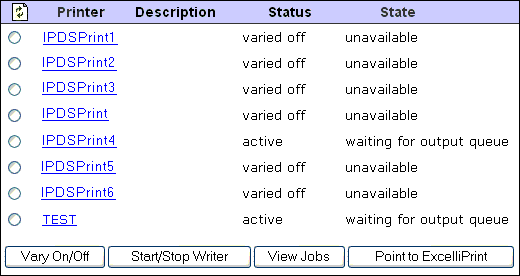
| Printer column | Displays the name of each IPDS device. Clicking a device’s name opens the AS/400 Job Status page, which lists detailed information about the device’s current jobs. To the left of each printer there is a radio button that allows you to select a specific printer and vary it on or off, start or stop its writer, view its jobs, or point it to ExcelliPrint |
|---|---|
| Description column | Displays a description of each IPDS device |
| Status column | Displays the current status of each device (for example, active, varied on, and so on) |
| State column | Displays the current state of each device’s writer (for example, waiting for queue, stopped, and so on) |
| Vary On/Off button | Varies the selected device on or off. The status (for example, varied on or off) is displayed in the Status column |
| Start/Stop Writer button | Starts or stops the selected device’s writer. The current state of the writer (for example, waiting for output queue or stopped) is displayed in the State column |
| View Jobs button | Allows you to view the selected device’s current print jobs. Clicking view jobs opens the AS/400 Job Status page, which contains detailed information about the print jobs associated with the selected device |
| Point to ExcelliPrint button | Allows you to modify the selected device’s settings. Clicking Point to ExcelliPrint opens the Modify AS/400 IPDS Printer page |

| Create Printer field | When adding a new printer device, enter the device’s name in the Create Printer field then click Create Printer |
|---|---|
| Create Printer button | Opens the Modify AS/400 IPDS Printer page and creates a new device with the name entered in the Create Printer field |