
How to secure your RPM print server
Screenshots in this article are from RPM 6.2.
Usually, you have the most to worry about network security from websites you visit and phishing links in emails. However, security issues regularly target network servers. Just ask your website administrator about that. Network services come under attack all the time.
RPM Remote Print Manager® (“RPM”) is a print server, and like all print servers, it’s still a network service. Anyone in your domain can connect with RPM for any reason. Unfortunately, that reason may have nothing to do with printing.
In this article:
- How RPM deals with network scanners using web requests
- How to arm RPM against network scanners using invalid print requests
- How RPM secures your printer by isolating print jobs
How RPM deals with network scanners using web requests
Web servers are among the most common network servers on the internet. Not only that, but many devices, such as printers, have a built-in web server. For that reason, now that RPM reports on questionable LPD commands using critical events, we’re starting to see reports like the following:
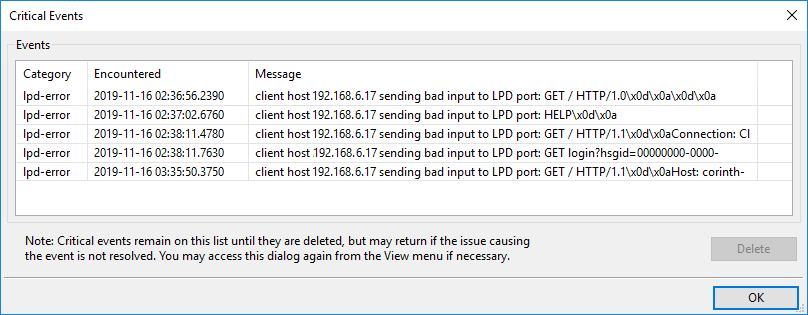
The critical events dialog shown here tells us that RPM received, on the LPD protocol port, commands such as “GET / HTTP 1.1” and similar. These are commands that your web browser would send to a Web server. This report tells me that a program on a computer with the address 192.168.6.17 has found the RPM printer port and is attempting to query it. This activity should not interfere with RPM’s normal operations.
In this situation, we recommend that this user add the address “192.168.6.17” to the firewall on the computer running RPM and then check that other computer for rogue programs.
How to arm RPM against network scanners using invalid print requests
We have been getting reports from customers for years about “strange queue names appearing in the user interface” and asking how to stop this. Here is an example from an earlier blog post:
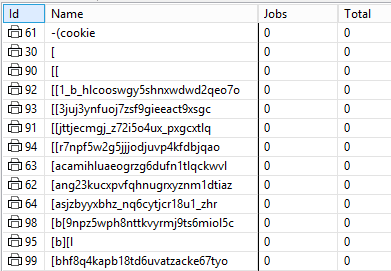
Using diagnostic logging, we determined that a network scanner would send “probes” or incomplete LPD requests designed to get a print server to fail.
We generally handle wrong input gracefully, but the problem became severe enough that we took several steps to deal with it more decisively:
- we log the wrong input
- we close the connection
- we generate a critical event so that you, the user, can see what the command was and the sender’s IP address.
For this kind of problem, we have two recommendations for you to consider.
First, contact your network administrator and give them the IP address of the computer sending these print commands. We cannot think of why this is a good thing.
At the same time, add the client IP address to your local Windows firewall to prevent that program from contacting you again. If this blocks your print traffic, you’ll have to allow the traffic but follow up with your administrator about deactivating the probe.
Second, you can block RPM from creating new queues on request. This action only affects queues resulting from incoming print requests. You can still create queues in the user interface without restriction.
To configure RPM to block queues from being created from print requests:
- Go to Configure / Port Settings
- select the “lpd” protocol from the list
- Click “Modify Port”
- Disable the setting “Auto-create queues on request” by making sure it is not selected or checked
A previous post, “How to prevent queue names appearing in RPM,” discusses this section in much more detail.
How RPM secures your printer by isolating print jobs
You might have heard of “SQL injection,” where someone inserts commands in a form entry to do something behind the scenes in a web server. Or you might be aware that an infected or malicious web server might embed a virus and get you to download it. RPM is not built that way, and there are specific reasons why.
RPM composes its SQL with bound parameters, so a value that arrives over the network is passed to the database as data rather than as a command. The print protocols are the only path by which anything from outside reaches RPM, and the arguments they carry — queue name, user name, job name — are validated before they get near the database. We audited and hardened that path in RPM 6.2.0.600, released April 2026. There is more detail on RPM’s database layer in Securing Firebird 2.5.
Beyond the database, we have made decisions regarding security all along with RPM. Here are the main points of that security.
- RPM can run with no internet connectivity at all. Many customers place it on an isolated or air-gapped segment specifically to keep printed data away from outside access, and licensing supports that with a manual activation path that needs the network only once.
- You can restrict which machines are allowed to send print jobs to RPM at all, including a deny-all-except-listed mode with CIDR support. See Host Access.
- RPM treats incoming print jobs as data only. RPM never executes print jobs in any sense. They are only passed along as data to actions that you configure yourself.
- You configure actions on your local PC.
- The UI can connect to a remote RPM, but please note you must explicitly enable this on the remote RPM host first
Conclusion
You may find yourself one day with dozens of weird queue names or a critical events dialog with dozens of messages. While annoying, neither of these should affect your operations, and there are steps outlined above that you can take to track down and eliminate the problem.