
INTELLIscribe Print Destination Window

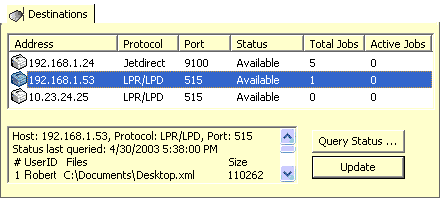
The Destinations window displays the destinations contained in the selected queue. When the queue selection is changed, this list is updated with the destinations of the newly selected queue.
From this window, you can query the status of the selected destination. The information returned from the destination depends upon which protocol is used, LPR/LPD Protocol or HP JetDirect Protocol.
Clicking the Update button opens the Virtual Printer Port Wizard to the selected port and opens the Destinations step of the Wizard, allowing you to add, remove, or modify the destinations for the virtual printer port.
Icon Assistance
An icon next to each destination represents the current status. The icons and the status are as follows:
 = The current state of the destination is unknown
 = The destination is currently available
 = The destination is busy or is not responding
 = The destination is currently being tested.
 = An error has been detected in the destination