
INTELLIscribe: Print Job and History

The Print Jobs window contains a list of print jobs that INTELLIscribe has printed, is currently printing, has failed to print, etc. for the port currently selected in the Virtual Printer Port window. A small icon next to each entry represents the current status of the job.
The window also displays the following:
- Job identification number
- Job name
- Time scheduled
- Time completed
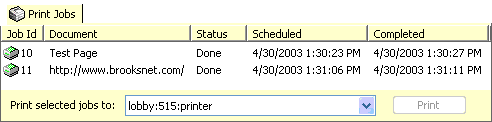
This list cannot be sorted. The Job menu appears when right-clicking any of these entries. This menu allows users to cancel, delete, or reprint the selected job, or access the Properties dialog.
Print Job Status Messages
A small icon next to each print job represents the status. Here is a list of the various status messages available:
- The status has not been decided
- The job is waiting but has not been scheduled
- The job is waiting to print and has been scheduled
- The job is currently printing
- The job has an error and was not printed
- The user has canceled printing this job
- The print operation completed successfully
- The job did not print and will be scheduled again
- The print job has been deleted