
IPDS Printing - Detailed Log Viewer
The ExcelliPrint® web interface displays the Detailed Log Information page when you view log information. This log displays many useful data, making monitoring the print jobs easier.

| Info checkbox | Check this box to display information-related messages |
|---|---|
| Warning checkbox | Check this box to display warning messages |
| Error checkbox | Check this box to display error messages |
| Network Detail list | Select the level of logging detail you want to see at the network level (for example, none, low, or high) |
| Device Detail list | Select the level of logging detail you want to see at the device level |
| Application Detail list | Select the level of logging detail you want to see at the application level |
| Records Per Page list | Select the number of records you want to be displayed per page |
| View button | Click the View button to update the table based on the selected settings |
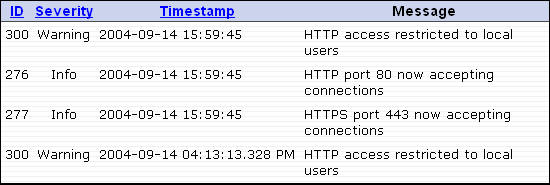
| ID column | Displays the message’s ID code. You can sort by message ID by clicking the column heading |
|---|---|
| Severity column | Displays each record’s message type (for example, info, warning, or error). You can sort by severity by clicking the column heading |
| Timestamp column | Displays the time when the message was recorded. You can sort by timestamp by clicking the column heading |
| Message column | Displays the message associated with the message ID |