
IPDS Towers and Color Support
ExcelliPrint® interprets these IPDS towers:
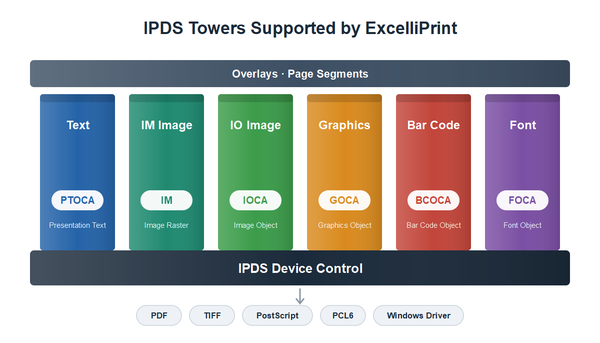
- Text (PTOCA)
- IM Image
- IO Image (IOCA)
- Graphics (GOCA)
- Font (FOCA): the printer’s resident fonts, and raster and outline fonts the host downloads
- Bar Code (BCOCA)
Overlays and page segments stored on the host print with the job’s pages, as they would on an IBM printer. Every output format is drawn by the same engine, so text, images, bar codes and overlays are placed identically in all of them.
ExcelliPrint helps you preserve your original document integrity while making the best use of modern systems.
Color
The IBM printers ExcelliPrint emulates, the 4028, 3812 and 3816, print black only, so most hosts format their jobs in black and white. Colors a job does contain are kept in every format that can show them:
| Colors as the job has them; PDF/A-2b defines them as the archiving standard requires | |
|---|---|
| TIFF | Color (the default), grayscale, or black and white compressed with CCITT Group 4 |
| PostScript | Color on color PostScript printers |
| PCL6 | Color on color PCL6 printers |
| Windows Driver | Whatever the printer’s driver can print, in color or black and white |
More information
On the Wikipedia, IBM Intelligent Printer Data Stream, or the IBM IPDS reference