
IPDS to PDF conversion
ExcelliPrint® converts your IPDS documents to PDF; it can be your virtual AS/400 PDF printer. Point a printer device on IBM i or z/OS at an ExcelliPrint queue, and each job arrives as a PDF file in a folder, as an email attachment, or on a printer that accepts PDF.
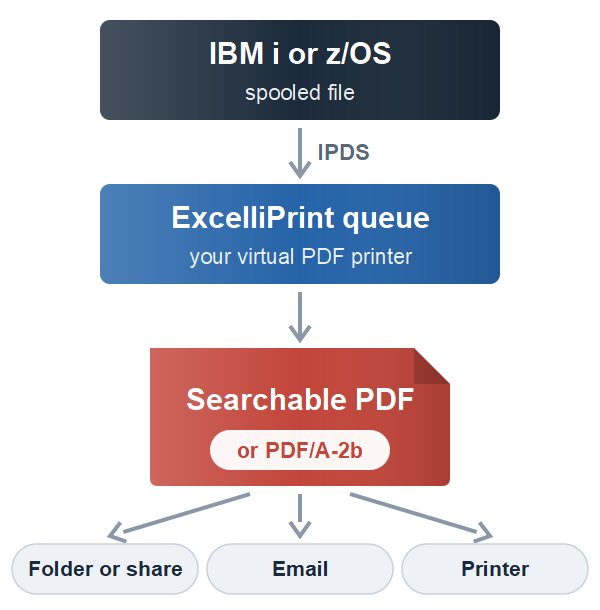
Searchable PDF
ExcelliPrint produces a PDF visually just what the designer decreed for your document, and the text in it is real text: you can search for it and copy it in any PDF viewer, such as the free Adobe Reader. PDF documents submitted to your document management system will index precisely as you expect.
Fonts are embedded where needed. Courier, Times and Helvetica are PDF’s own standard fonts, which keeps files small.
PDF/A for archives
Choose PDF/A-2b (ISO 19005-2), the standard for long-term archiving: every font is embedded, colors are defined, and nothing depends on outside resources, so the file will display the same years from now.
Passwords and permissions
A PDF can have a password to open it, and an owner password that controls what it allows: printing, copying text and images, and changes. This applies of course, only to programs that follow the rules. The term “PDF security” is a bit misleading. A PDF/A file can’t have passwords.
File names from the job
Each PDF is named from the details the host sends with the spooled file, such as job name, user, spooled file name and number, form type and the date, so invoices, reports and statements land where they belong. Save to a local folder or a network share, email the PDF, or send it to a printer.
ExcelliPrint is your affordable solution to print to PDF from your AS/400.