
RPM Archive Action
Screenshots in this article are from RPM 6.2.
The archive action saves the print stream to the specified folder. RPM constructs the filename from print job data using your specification. You also specify whether to create a new file, overwrite an existing file or append to a file. Of course, you specify the folder path for storing the file and several related items.
Purpose
The archive action gives you full control over the target folder, the credentials you’d need if the folder is shared, and of course, all the file naming options you would need.
For a more thorough discussion of how this action is used please see the RPM Archive Portal page.
Operation
In RPM version 6.2.0.501 we significantly reworked the way the archive action works with output files. This was done partly to work better with third-party folder watchers, or directory monitors.
We also discovered a vulnerability with the append operation that we corrected.
How we improved folder watcher support
RPM writes to a temp file. When the job is complete, the temp file is moved or copied into place, in one operation. This works across disk drives, so there is no need to be concerned that you can’t correctly archive to another drive. We did all our testing in a two-drive environment. This also makes the archive happen all at one time so that folder watchers can respond appropriately.
How we improved append support
Before, we opened the output file for append and wrote to it when data was available.
The only problem with this approach, we realized, is that if someone was processing multiple jobs at a time that happened to write to the same location; or if another program had that same file open; data may be lost or corrupted.
The archive action now opens the file with exclusive access, if we are appending. This should prevent problems with concurrent writes from multiple jobs or from another process at the same time RPM is writing to the file.
Setup
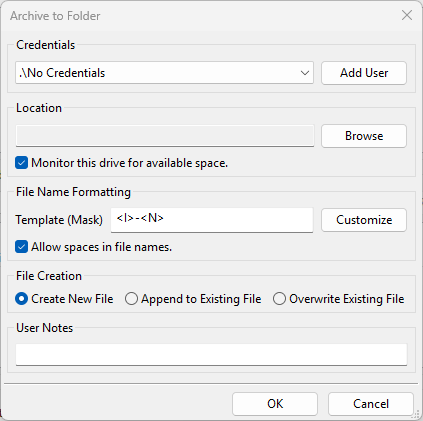
- Credentials Select the username, password, and domain for an account with sufficient access to the destination folder. You use this with shared folders, therefore, this setting is optional. Note the value “.\No Credentials” means no shared access.
- Add User RPM maintains a set of user credentials for use with shared disks and printers. If you want to create a new set of credentials, do that here. When the Add User dialog is closed, the user interface will attempt to validate the login to ensure valid credentials.
- Location Click Browseto locate the folder in which you would like to save these documents. Note: If you browse to a mapped network drive, RPM will automatically convert the destination folder to a UNC path. This setting is required.
- Monitor this drive for available space If this is set, RPM will query the device for available space before attempting to add a file, so we don’t find ourselves in a position of filling a disk without reporting. This setting is optional.
- File Name Formatting Use the Variables droplist along with the Insert button and the Template mas to customize the name of the file(s) to be created. Note: Many of the file format options are limited to jobs received using the LPR/LPD protocol. If jobs are received using other methods, most of these tags will be blank.
- Allow spaces in file names If this is not selected, RPM will replace any spaces with an underscore.
- File Creation If a file by the same name already exists, select whether to create a unique filename, append the contents of the incoming file to an existing file, or overwrite an existing file.