
RPM Filter Action-Run a Program
Screenshots in this article are from RPM 6.2.
The term “filter” derives from the Unix operating system, where a “filter” somehow transforms your print job. The RPM filter action runs a local program on the print stream.
We added the Filter FAQ to address various issues and provide our expertise in running programs with RPM Remote Print Manager® (“RPM”).
Purpose
RPM gives you the option to run a program on your print job. What you accomplish with that is up to you.
RPM has supported the filter action since the beginning. The term “filter” comes from the Unix world and experience configuring the Berkeley print server to process a PostScript file into HP printer codes, using Ghostscript, of course. In that situation, there was no PostScript printer available, but that was literally “no problem.”
No matter how capable you make a program, you can always add to it by getting it to run the customer’s software. It’s a hard combination to beat.
Setup
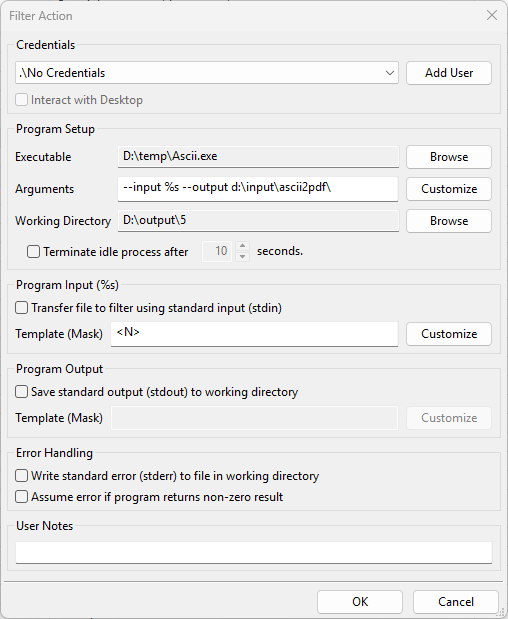
- Credentials Optionally, select the username, password, and domain for an account with sufficient access to the destination folder. If you choose “Interact with Desktop” then Windows will attempt to match a Windows desktop with this user.
- Add User Enter another set of login credentials. When you close the Add User dialog, the user interface will attempt to validate the login to ensure valid credentials.
- Interact with Desktop Select this option if your filter program requires user interaction. Note When this option is selected, the filter program will run only when the user specified in Credentials is logged on. If Credentials are not specified, this option cannot be selected.
- Executable Click Browseand locate the program or batch file that RPM will execute when print documents are received. Note Only compiled Windows programs with .com, .exe, or .bat extensions can be executed. Scripting languages such as VBScript can be run by calling the script interpreter program here.
- Arguments If your program requires specific parameters, enter those here. If you need to use information from the print job, RPM can do this. See Argument substitution below.
- Working directory Specifies the working directory where Windows starts the program.
- Terminate idle process after X seconds Select this option only if your filter program does not terminate after it has finished processing.
- Transfer file to filter using standard input RPM can stream the input file to the program. Many programs with UNIX origins support standard input.
- Program Output RPM can stream the program’s output to a file. This option allows you to customize the filename receiving the standard output.
Note: Many of the “save output” options are limited to jobs received using the LPR/LPD protocol. If jobs are received using other methods, most of these tags will be blank - Save standard error (stderr) in working directory Select this setting to capture anything your program might write to stderr. When the program finishes, RPM removes the error log if it’s empty.
- Assume error if program returns non-zero result Select this to cause RPM to error the job, if stderr is not empty; otherwise that will not influence job status
Argument substitution
RPM provides the following tags to embed in the command line. RPM will replace these tags with information from the print job. Note: Use of the tags is limited to jobs received using the LPR/LPD protocol. Most of these tags will be blank if jobs are received using other methods (i.e., telnet printing or drag and drop).
- %s = name and path of the processed file containing the print stream
- %f = name of the file without the path
- %q = RPM queue name
- %i = RPM id number
- %S = RPM queue sequence number
- %n = name of the source file
- %j = job name from control file
- %t = title from control file
- %b = banner from control file
- %c = class from control file
- %h = hostname specified by the LPR client
- %u = user sent in the control file
- %e = email field from the control file
- %S = queue sequence number
- %C = control file name and path
Note: If you need any of these literal strings in your argument list, you can prevent RPM from substituting them by “escaping” the percent sign with another. For instance, if you have %%C in your argument list, RPM will not substitute it for the control file name and path but will change it to a literal %C.
Further reading
- the Filter FAQ covers a range of topics related to using the filter action
- the Idle Process page discusses that topic in more detail