
RPM Text Print Action
Screenshots in this article are from RPM 6.2.
Prints documents to any Windows printer using text formatting capabilities and features.
Purpose
RPM has supported Windows printing with full control of fonts and layout metrics since the beginning. Text print prints through the Windows print system and supports the following:
- local Windows printers
- printing to shared printers, using Windows login credentials
- interactive printing, using login credentials and tracking the logged-in users
- optional watermarks for Elite only
Text markup
The text print action uses text markup for input. Typically you would want to use one of these transforms with the text print action:
- text markup
- SCS to text markup
- ASA to text markup
- optionally: use COR after one of the above
If the text print action detects that its input is not text markup, then it will use a text markup transform to convert the input. The defaults settings for the transform are:
- Courier New
- auto-calculate the layout
We do this because having results you can adjust is better than an error message. However, if the defaults are not quite right for you, then you are going to want to add a text markup transform and set it up to best meet your needs.
The text markup page explains a great deal more about text markup, and in particular auto-calculate. 2:58 PM 7/16/2026
Setup
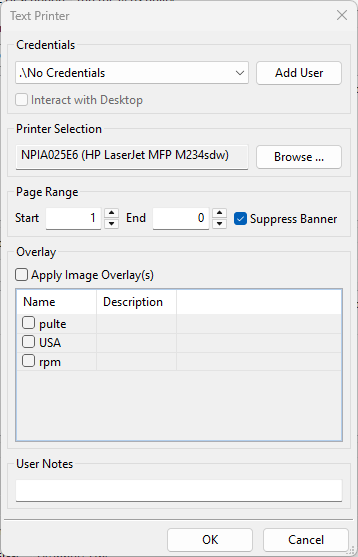
- Credentials Optionally, select the username, password, and domain for an account with sufficient access to the destination printer. An account with full access to the printer will allow RPM to control the filename passed to the Windows spooler. We have a page that discusses printing and credentials.
- Add User Enter another set of login credentials; when the Add User dialog is closed, the user interface will attempt to validate the login to ensure valid credentials.
- Interact with Desktop If this is selected, RPM will attempt to process jobs visible to the desktop. Some print drivers or port monitors may require a user to perform some predefined action before document output. For example, the FILE: port requires you to specify the filename. If your printer requires user interaction, select this option. Note When selecting this option, the job will be printed only when the user specified in Credentials is logged on. If Credentials are not specified, this option cannot be selected.
- Printer Selection Click Browse to select the printer to which documents will be printed. By opening the print properties dialog, you can specify additional printer finishing functions such as 2-sided printing, tray selection, etc.
- Start page Begin printing all documents on the configured page number.
- End page Do not print any pages beyond the configured number. Specify 0 to print to the actual last page of the document.
- Suppress banner page This setting prevents RPM from creating and printing a banner page regardless of whether requested to do so by the print client. Note that during the trial, a banner is always printed.
- User notes All actions now include a notes field to help you remember later what you were doing
Watermark (Elite only)
- Apply Image Watermark(s) This setting toggles whether or not to apply watermarks to this action. Watermarks are now centrally defined, including all the settings for the image, where it’s placed, etc. You choose one or more watermarks to include in this action.