
AS/400 Remote OUTQ on V4R4 (version 4.4) and Later
Screenshots in this article are from RPM 6.2.
The purpose of this document is to assist you in configuring your System i (iSeries, AS/400) to print through RPM. It is intended for AS/400 and network administrators. For these instructions, you need to know the IP address or DNS hostname of your computer where RPM is installed.
Creating a Queue in RPM
- In RPM, go to Create from the Queue menu.
- Enter the name of the new queue you wish to add and click Create. The new queue will be created.
- Highlight the queue and choose Settings from the Queue menu. Add the action(s) necessary to produce your desired results. For instance, if you want to archive the file to disk, add Archive to disk. If you want to print the documents, choose a Text printer action.
- Now add any transforms you require. The steps in the next section, when followed exactly, require an SCS to text markup transform. If you are using a Text printer action, no further transforms are necessary. If you are archiving the files to disk, you could use either Text markup to PDF or Remove text markup transform.
Note: These instructions are intended to provide only a brief introduction on RPM configuration. For more detailed instructions, refer to the RPM manual.
AS/400 Remote OUTQ on V4R4 (version 4.4) and Later
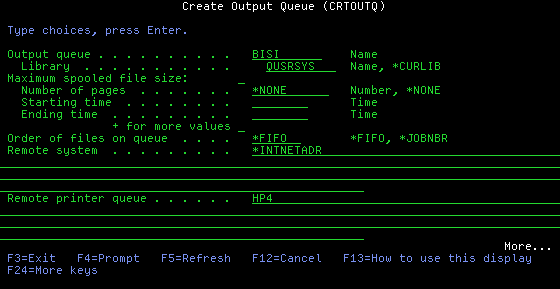
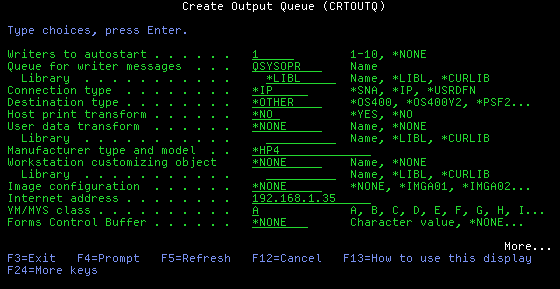
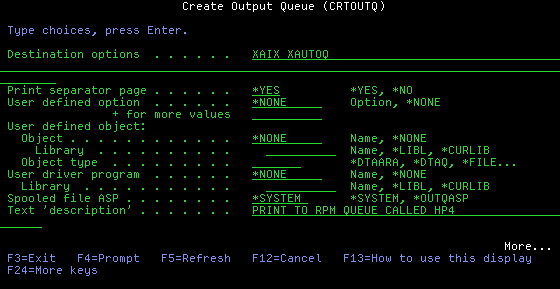
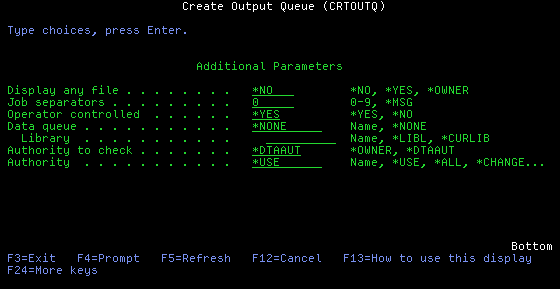
To print to RPM from a System i (iSeries, AS/400, etc.), a remote output queue (OUTQ) is used.
- To create the remote OUTQ, use the CRTOUTQ command.
- To modify an existing OUTQ, use the CHGOUTQ command.
The remote OUTQ should have the following settings. Substitute appropriate values in place of [OBJECT_NAME], [RPM_QUEUE], and [IP_ADDRESS].
Output queue  . . . . . . . . . . . . . :[OBJECT_NAME]
  Library . . . . . . . . . . . . . . . : QUSRSYS
Maximum spooled file size:
  Number of pages . . . . . . . . . . . : *NONE
  Starting time . . . . . . . . . . . . :
  Ending time . . . . . . . . . . . . . :
Order of files on queue . . . . . . . . : *FIFO
Remote system . . . . . . . . . . . . . : *INTNETADR
Remote printer queue  . . . . . . . . . :[RPM_QUEUE]
Writers to autostart  . . . . . . . . . : 1
Queue for writer messages . . . . . . . : QSYSOPR
  Library . . . . . . . . . . . . . . . : *LIBL
Connection type . . . . . . . . . . . . : *IP
Destination type  . . . . . . . . . . . : *OTHER
Host print transform  . . . . . . . . . : *NO
User data transform . . . . . . . . . . : *NONE
  Library . . . . . . . . . . . . . . . :
Manufacturer type and model . . . . . . : *HP4
Workstation customizing object  . . . . : *NONE
  Library . . . . . . . . . . . . . . . :
Image configuration . . . . . . . . . . : *NONE
Internet address  . . . . . . . . . . . :[IP_ADDRESS]
VM/MVS class  . . . . . . . . . . . . . : A
Forms Control Buffer  . . . . . . . . . : *NONE
Destination options . . . . . . . . . . : XAIX XAUTOQ
Print separator page  . . . . . . . . . : *YES
User defined option . . . . . . . . . . : *NONE
User defined object:
  Object  . . . . . . . . . . . . . . . : *NONE
    Library . . . . . . . . . . . . . . :
  Object type . . . . . . . . . . . . . :
User driver program . . . . . . . . . . : *NONE
  Library . . . . . . . . . . . . . . . :
Spooled file ASP  . . . . . . . . . . . : *SYSTEM
Text 'description'  . . . . . . . . . . : PRINT TO RPM QUEUE
Display any file  . . . . . . . . . . . : *NO
Job separators  . . . . . . . . . . . . : 0
Operator controlled . . . . . . . . . . : *YES
Data queue  . . . . . . . . . . . . . . : *NONE
  Library . . . . . . . . . . . . . . . :
Authority to check  . . . . . . . . . . : *DTAAUT
Authority . . . . . . . . . . . . . . . : *USE
Additional information on setting up an AS/400 for V4R4 (version 4.4 and later) can be found here.
Troubleshooting
Q: I get “Cannot find data queue in library” on my AS/400 when I try to print.
A: You must leave the library name blank after the Data queue field entry of
*NONE — see the Data queue and Library lines in the parameter listing
above.
Q: Error: Unable to find data queue in library (AS/400 V3R6).
A: Same cause, with slightly different wording on V3R6. If you have made all the
entries shown in the CRTOUTQ listing above and still get this error, leave the
Library field blank.
Q: When moving a spool file to another queue, the AS/400 OS asks for a printer.
A: This happens when the spool file is moved to the REMOTE OUTQ and a printer is selected instead of a queue. Enter 2 to change, then F4 to prompt, and move the spool file to a queue rather than to a printer.
Q: The writer ended abnormally (abended).
A: Almost always the remote OUTQ is pointing somewhere RPM is not, or the AS/400
is not permitted to check authority the way RPM expects. Two entries account for
most cases, both shown in the CRTOUTQ listing above:
- Remote system — the name or IP address of the machine running RPM must be correct, either in the OUTQ definition itself or in the AS/400 host table if you configured it by name.
- Authority to check — must be *DTAAUT.