
How to print to RPM from an IBM/VSE mainframe
Q: How do I print to RPM Remote Print Manager® (RPM) from an IBM/VSE mainframe running a VTAM-based application?
A: You can use the General Print Server Daemon to spool jobs to RPM. Here is how to do that:
Use the DEFINE GPSD command to initiate an instance of a GPS Daemon (server). You must define one Daemon for each VTAM logical unit you wish to emulate.
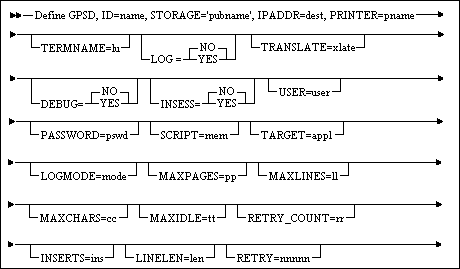
name:
- A 1- to 16-character alphanumeric name is used to identify this definition. The first character must be alphabetic.
pubname:
- The public name (enclosed in single quotes) of a library and sublibrary to be used by the GPS Daemon. This library will be used as a staging dataset for LPR data and to contain the optional logging file. It must be available to the TCP/IP filesystem e.g., through using a DEFINE FILE statement.
dest:
- The IP address (numeric or symbolic) of the remote host where the Line Printer Daemon resides. The port number is determined by the protocol.
pname:
- The name of a print queue. This name will be sent to the Line Printer Daemon on the remote host to identify the target printer. You must know this name and specify it here. Otherwise, the LPD will reject our attempts to send data. Note that the printer name can be supplied and/or overwritten in a SCRIPT. pname is case-sensitive.
lu:
- The VTAM LUname with which GPS will be known to VTAM applications. This value must be defined to VTAM as an application ID. If omitted, the default is GPSDTERM.
LOG:
- If ‘YES’, the GPS Daemon will create a log file. This file will have a name equal to the value specified for TERMNAME and an extension of ‘LOG’. This file is overwritten each time the Daemon is started. The file is a simple text file and can be viewed or printed using standard VSE facilities. The default value is ‘NO’.
This information was originally found on the IBM website; however, it is no longer available.