
RPM Break Pages Transform
Screenshots in this article are from RPM 7.0.
This transform introduces page breaks to files with regular line terminators.
Note that the transform tracks both lines and pages in your original file. It will not merely insert a page break every so many lines. See below for more details.
Reasons you might use the page break transform
- If your file has regular line delimiters, but no page delimiters, use this transform to add them
- If your file already has page breaks, you could use this to enforce a maximum page length. This would be useful if the occasional page is lacking a page break.
The way it works
- The transform maintains a line count
- Every line will increment this line count
- If RPM sees a page break in the input, it resets the line count
- When the line count reaches the “page length” value you set up, it adds a page break to the output and resets the line count
Setup
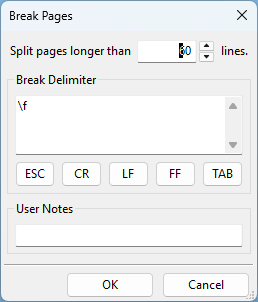
- Split pages longer than N lines RPM adds a page delimiter each time it sees this many input lines without one. The default is 60.
- Break Delimiter The string RPM uses to delimit pages. The default,
\f, is the ASCII form feed. The Esc, CR, LF, FF and Tab buttons add those control characters.