
RPM Data Extraction Transform
Screenshots in this article are from RPM 6.2.
The Data Extraction transform does not actually change your print job data. Instead, it scans your data and extracts fields using the directions you give it. It assigns values from your actual print job to the job attributes used to control your outputs.
When the Data Extraction transform runs, your print job should be plain text. Lines and columns should be consistent from job to job.
Setup
Using the Data Extraction dialog consists of creating and editing rules. Each rule specifies which job attribute you are extracting, and the position in the file to find it.
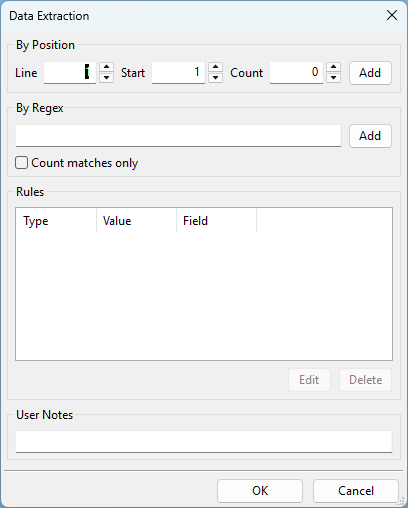 There are two ways to determine how to extract the data:
- by position, that is by line and column
- by regular expressions, which would be the pattern
Once you create rules, you can click on the rule to edit it or remove it altogether.
The fields in the dialog work as follows.
- By Position
- Line: Enter the line number of the data file which contains the string to be captured.
- Start: Enter the position on the line where the string is located.
- Count: Enter the number of characters of the string to be captured.
- Add: Click this button to add the positional-based data extraction. A subsequent dialog will be displayed where you can select which variable you wish to override.
- By Regex
- Field: Enter the regular expression required to extract the desired string.
- Add: Click this button to add the regex-based data extraction. A subsequent dialog will be displayed where you can select which variable you wish to override.
- Rules: This list contains the existing rules configured to extract information from the incoming data file.
- Edit: Click this button to remove the rule from the list and add it to the above fields for rule modification.
- Delete: Click this button to delete the data extraction rule