
RPM Filter Transform
Screenshots in this article are from RPM 6.2.
(Elite only) Run an external program for custom data transformation.
Purpose
The filter transform reads input and produces output. RPM Elite can use this internally as it is processing a job prior to printing or other actions. For some workflows, this may save time and extra steps.
RPM has supported the filter action from the beginning. We started considering a filter transform when our customers reported to us that they were running their own software on a print job, then they wanted to send the results back into RPM for further processing.
We introduced the filter transform in RPM Elite 5.0. We currently use the mechanics of the filter transform, in RPM, for a number of features. Consequently, we are interested in how this is used and are willing to support your efforts.
Setup
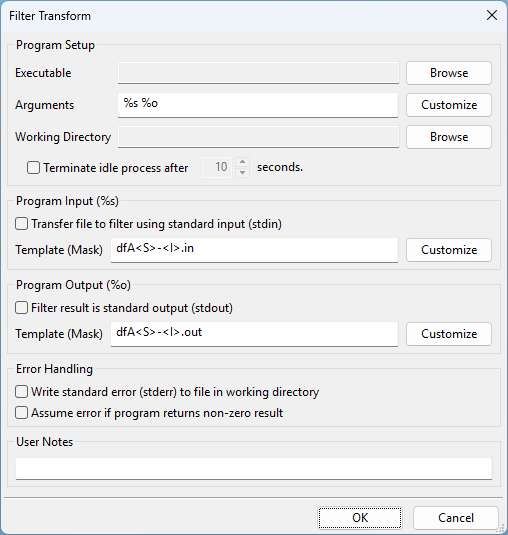
- Filter Program Click Browse and locate the program or batch file to be executed when print documents are received. Note: Only compiled Windows programs with .com, .exe, or .bat extensions can be executed. Scripting languages such as VBScript can only be run by calling the script interpreter program first and passing the script and arguments to it.
- Arguments If your program requires specific arguments enter those here.
- Working directory Specifies the working directory when the program is started. The program can change its working directory during the course of operation.
- Terminate idle process after X seconds Select this option only if your filter program does not close after it has finished processing.
- Transfer file to filter using standard input The data is streamed to the filter program. Many programs with UNIX origins support standard input.
- Input filename Allows you to customize the name passed in the %s variable of the command arguments (see above). Note: Many of the file format options are limited to jobs received using the LPR/LPD protocol. If jobs are received using other methods (i.e. telnet printing or drag and drop), most of these tags will be blank.
- Filter result is standard output If the filter program streams its result to standard output, select this option. Many programs with UNIX origins support standard output.
- Save standard error log Causes the program’s standard error to be output to a file in the RPM Temp folder if it is not empty when the filter program finishes.
Command-line substitution
RPM provides the following tags which are substituted with information from the print job.
- %s = full path to the file to be processed
- %f = name of the file to be processed without the path
- %o = path and filename of the program’s output file
- %O = filename of the program’s output file without the path
- %n = name of the source file
- %j = job name from control file
- %t = title from control file
- %b = banner from control file
- %c = class from control file
- %h = hostname specified by the LPR client
- %u = user sent in the control file
- %e = email field from the control file
- %S = queue sequence number
- %q = RPM queue name
Note: Use of the above tags is limited to jobs received using the LPR/LPD protocol. If jobs are received using other methods (i.e. telnet printing or drag and drop), most of these tags will be blank.
Note: If you need any of these literal strings in your argument list, you can prevent RPM from substituting them by “escaping” the percent sign with another. For instance, if you enter %%n in your argument list, RPM will not substitute it for the name of the source file, but instead will change it to a %n. Notice one of the percent signs are removed.