
RPM PCL Resource Mapping transform
Screenshots in this article are from RPM 6.2.
The PCL Resource Mapping transform will reassign input trays and output bins in a PCL print job. You set up one or more assignments, and when this transform runs it will make those assignments for you. Plus it will optionally log the existing settings.
This capability is available only in RPM Elite. You can do the same thing in RPM Select with the string mapper but you have to know binary codes and regular expressions.
Recent improvements:
- We’ve added support for PCLXL to the existing support for PCL5
- We’ve changed the log to show input trays and output bins once, at the end, rather than each time we encountered that command
- We’ve added partial match support so if a command spans buffer boundaries we can still catch and update the command
Setup
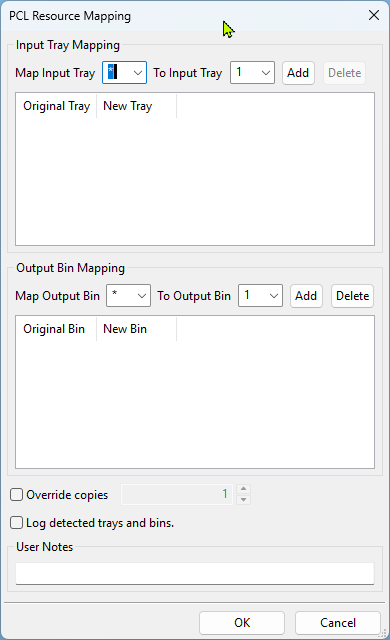
- Map Input Tray
select an input tray, * matches all trays - To Input Tray select the tray to map this input to
- Add
this button adds the assignment to the processing list - Delete
if you select an assignment from the list, this button will delete it - Map Output Bin
select an output bin, * matches all trays - To Output Bin
select the bin to map this input to - Add
this button adds the assignment to the processing list - Delete
if you select an assignment from the list, this button will delete it - Override copies
Change the copies directive to a new value - Log detected trays and bins
log any existing input trays and output bins in the stream to the Event pane
Examples
This transform would let you change input tray assignments if you had a print job intended for trays or bins that your current printer does not support, assuming the paper sizes were compatible.
Logging example
One of the hardest things to know in advance is which trays and bins your job specifies. This is why we have the logging switch. You can run a job through this transform without specifying trays or bins, and by turning on logging, you can see which commands it already has. Note that the logs will appear in the user interface Event log.
Last updated Tuesday, December 22, 2020