RPM Remove Lines Transform
Screenshots in this article are from RPM 7.0.
Removes a configurable number of lines from the beginning of the data file.
Purpose
This transform seems to resemble Remove Bytes but in reality, it came about from removing banner pages and ultimately is part of the Page range problem.
For instance, if you know you want to process starting on page 3, and you know your file is 60 lines per page, then just enter “120” as the “Number of lines to remove”.
Setup
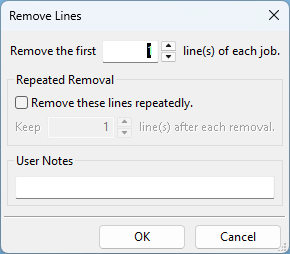
- Remove this many lines from beginning of the job Enter the number of lines you wish removed from each incoming document. If the document contains that many or fewer lines, then nothing is passed along.
- Remove these lines repeatedly Remove the same number of lines again after every block you keep. Use it to drop a header from every page of a document with a fixed number of lines per page.
- Keep N lines after each removal With repeated removal on, the number of lines to keep between removals. For a 60-line page with a 3-line header, remove 3 and keep 57.