
RPM String Translate Transform
Screenshots in this article are from RPM 6.2.
The String Translate transform allows you to substitute text in your print job or eliminate text.
Setup
- Search: this is the string to search for. It can contain a regular expression, or it can be binary characters or plain text – or any combination.
- Replace: this is the string you substitute each time RPM finds the search string.
Examples
- Input trays in a PCL job; or the output bin. Our technical staff frequently assists customers with this task.
- Other common PCL parameters such as font ID, margins, etc.
- To correct the spelling of a customer name in a report, business name, street address.
UTF-8 text
Starting with RPM version 6.2.0.504, you can copy/paste UTF-8 strings into the Search and Replace fields. Up to that point, you were required to use hex notation (see next topic).
Hex notation
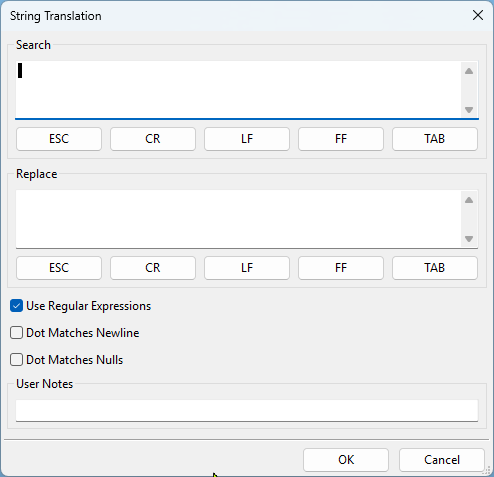
The Search and Replace fields both support binary characters. You use hex notation to denote a binary character in this form:
\xDD
where DD is two hex digits. For instance, the string \x1B represents the ESCAPE character.
Typically you would use hex notation when you were editing binary files such as a PCL print job.
Regular expressions
Regular expressions allow more complex search and replace functions by identifying repetition or patterns of characters. RPM allows regular expressions in the string translation transform in both the Search and Replace fields.
- \ Indicates the next character has a special meaning. “n” on its own matches the character “n.” “\n” matches a linefeed or newline character. See examples below (\d, \f, \n etc).
- ^ Matches/anchors the beginning of the line.
- $ Matches/anchors the end of the line.
- * Matches the preceding character zero or more times.
- + Matches the preceding character one or more times. Does not match repeated newlines.
- . Matches any single character except a newline character. Does not match repeated newlines.
- (expression) Brackets or tags an expression to use in the replace field. A regular expression may have up to 9 tagged expressions, numbered according to their order in the regular expression. The corresponding replacement expression is \x, for x in the range 1-9. Example: If (h.*o) (f.*s) matches “hello folks,” \2 \1 would replace it with “folks hello.”
- [xyz] A character set. Matches any characters between brackets.
- [^xyz] A negative character set. It matches any characters NOT between brackets.
- \d Matches a digit character. Equivalent to [0-9].
- \D Matches a non-digit character. Equivalent to [^0-9].
- \f Matches a form-feed character.
- \n Matches a linefeed character.
- \r Matches a carriage return character.
- \s Matches any white space including space, tab, form-feed, etc. but not a newline.
- \S Matches any non-white-space character but not a newline.
- \t Matches a tab character.
- \v Matches a vertical tab character.
- \w Matches any word character, including underscore.
- \W Matches any non-word character.
Examples
p.t matches “pat”, “pot”, and “put” but not “part”.
Pa+st matches “past”, “paast”, “paaaast” etc. BUT NOT “pst”.
Pa*st matches “past”, “paast”, “paaaast” etc. AND “pst”.
[aeiou] matches lowercase vowels
[,.?] matches a comma (,), period (.), or question mark (?).
[0-9a-z] matches any digit or lowercase letter
[^0-9] matches any character except a digit (^ means NOT the following)
You may search for an expression A or B as follows. This will search for an occurrence of Chase or Justin, or John. There should be nothing between the expressions.
“(Chase|Justin|John)”
You may combine A or B and C or D in the same search as follows, which will search for Chase or Justin or John followed by Jones or Smith.
“(Chase|Justin|John) (Jones|Smith)”