
Understanding Queue Folders

Queue Folders is our folder watcher product, built to work with RPM Remote Print Manager® (“RPM”). It is available starting with the RPM 6.2 release, for all current Windows platforms.
Please note that Queue Folders is available only with RPM Elite and requires a separate license. We did not bundle the Queue Folders license with RPM.
What does Queue Folders do?
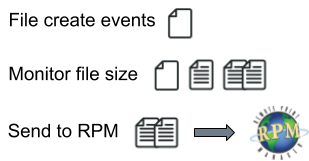
In a nutshell, this is what Queue Folders does:
- monitors a folder for new files
- when a file appears, it tracks the file size until it stops changing
- it sends the file path to RPM, which in turn adds the file as a job
- the folder path is associated with an RPM queue name, and RPM uses the filename as the job name
Queue Folders scans the folder on startup and adds existing files to RPM.
You can use any non-shared and non-watched folder on your system; that is, local folders only. It would be chaos to have two programs competing over files in a single folder.
You can associate any folder you like with an RPM queue, and you can use as many of your RPM queues as you like. The folder name does not need to match the queue name.
RPM opens the file exclusively so that it can get a username associated with the file. At the same time, RPM determines whether the program that created the file still has it open. Note that RPM retries if it fails to open the file.
Finally, if an outside program removes the file before RPM can add it as a job, RPM drops the attempt to use it for a job.
We have a complete description of Queue Folders on a separate page.
Compatibility
The Queue Folders Compatibility page explains what we support.
Installation and Setup
As we’ve mentioned, there are a few essential differences between this version and the previous. The Queue Folders Installation page advises you how to plan if you are upgrading from version 1.0. Please read this before you install version 2.0.
Configuring Queue Folders
Once you see how to configure a watch folder for a queue, you’ll get the rest done in no time.
Using Queue Folders
As we tested Queue Folders, we also experimented so we could offer practical advice and experience, how to use Queue Folders effectively in your RPM setup.
We also have a blog post on using Queue Folders to print files immediately, as a practical application.
Licensing
Licensing Queue Folders is not complicated.