
UNIX Printing to Windows with RPM
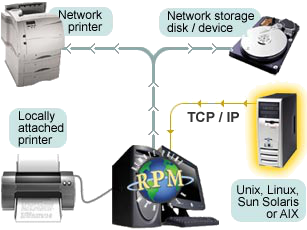
Format your UNIX spool files with RPM
RPM Remote Print Manager® (“RPM”) enhances UNIX printing to Window’s ability to customize and control the processing of UNIX print jobs received on a TCP/IP network. RPM, running on Windows systems, enables cross-platform printing by receiving print jobs over standard TCP/IP lines from local or remote UNIX & Linux systems (or any host system). Apply any formatting, perform data transformations, or call third-party applications, all before printing or archiving documents.
Easily format your UNIX spool files with RPM (Windows UNIX print services) before they are sent to your Windows-attached printer! Easily add a printer to UNIX with RPM and instantly be able to format your UNIX print jobs, set duplexing, stapling, and any other copier or printer commands. RPM provides the ability to take any UNIX spool file and save it to disk, whether it’s saving the file to your local disk or saving it to a network storage device.
UNIX Case Studies
- The Stewart Organization installed RPM to gain access to the printing functions available with Windows-based print drivers (e.g. duplexing, collating, etc). RPM formats the UNIX reports, fitting the print jobs on existing preprinted forms with no modification necessary on the UNIX server.
- Pyramid Corporation uses RPM to format reports from its UNIX-based accounting package. The UNIX server sends the reports to RPM, which formats the reports and spools them to Windows-based printers. Reports can even be sent to inexpensive InkJet and BubbleJet printers.
- Using RPM, a large newspaper was able to post HP files to the network for printing on laser printers and to archive non-PCL formatted spool files for offline storage, replace an outdated Novell server and reduce the number of steps in its billing process.
Easily Format UNIX Spool Files for Your Windows Printer
- RPM will format ANY UNIX text file and print to ANY Windows printer, regardless of paper size, tray selection, # of copies, paper orientation, or printer destination.
- RPM will translate ASA/FORTRAN control characters to PC printer commands on the fly.
- RPM can successfully receive jobs from standard Unix distributions such as Ubuntu and Red Hat
- One of our frequent requests is to solve the “stair-step” problem. This often happens when a UNIX file is sent to a DOS printer. RPM’s print queues can translate LF to CR/LF (UNIX to Dos Printing).
Locally or Networked
Print to Windows (local or networked) printers versus printing to mainframe printers.
- UNIX print-to-file (write-to-disk)
- Print to your locally attached printer
- Easy file transfer with UNIX
- Incoming data can easily be written to a file for archiving or other processing
- Print landscape in UNIX
- Send the job to your copier with duplexing, stapling, and sorting options included
RPM Offers Flexible UNIX Print Queues
Unix printing with RPM gives UNIX users an advantage by offering feature-packed UNIX printing queues, each having its special printing features. All print queues are fully customizable and perform different tasks.
Control Fonts and other Finishing Functions
RPM gives users the ability to control fonts with dynamic sizing using lines-per-inch and characters-per-inch. Any text data stream can be formatted for a Windows printer whether the printer is supported by UNIX or not!
Save to Disk or Integrate 3rd party software
The print job is captured to process with an application or saved to a file (file transfer) for archiving or other purposes. RPM checks for duplicate filenames before saving and has many file naming options. RPM can be configured to open print data in other applications such as word processors, spreadsheets, or other programs.
Print Raw Data bypassing the Windows Print Driver
RPM passes raw information from the UNIX system to the PC print queue bypassing the Windows print driver. RPM processes print data without modification as if the printer were connected directly to the host system through a parallel or serial connection. This print action supports advanced queue features such as transforming data, adding and appending bytes or a file, etc.
UNIX Printing Is Easy with RPM
RPM will boost your UNIX printing in many ways. Some of the common UNIX searches we see are:
- removing a print queue in UNIX
- setting up printer daemons in UNIX
- how to cancel UNIX print
- UNIX printing in Windows
- remote printer maintenance UNIX
- stopping printing banner sheet AIX
- changing printer destination UNIX
- and more
RPM can help out with all of these, for half the cost and no maintenance.
Helpful Links
- Try RPM for FREE!
- UNIX Case Studies
- Printable Data Sheet
- CUPS Printing Setup
- SUN Solaris Setup
- Linux Setup
- PowerPoint Overview
RPM Users Say …
UNIX print jobs now have access to advanced functions of our printer, without additional hardware.
Using RPM, printed output has been decreased by over 60% and important documents are placed in electronic archives. In addition, routine printing has been automated.