System setups • AIX 3.x • AIX 4.x • AS/400 • CUPS • HP3000 • HP9000 • Legacy Mac • Linux • Mac OS X • Mainframe • Sun Solaris • Sun OS • Windows
The purpose of this document is to assist you in configuring Sun Solaris to print through RPM Remote Print Manager® ("RPM"). It is intended for those familiar with Sun Solaris administration and LPR/LPD printing. For these instructions, you need to know the IP address or DNS hostname of the computer on which RPM is installed.
Creating a Queue in RPM
- In the UI, go to Create from the Queue menu.
- Enter the name of the new queue you wish to add and click Create. The new queue will be created.
- Highlight the queue and choose Settings from the Queue menu. Add the action(s) necessary to produce your desired results. For instance, if you want to archive the file to disk, add Archive to disk. If you want to print the documents, choose a Text or Raw printer action.
- Now add any transforms you require. If the data is plain text, a Text markup transform may be used. Once in text markup, it can be converted to PDF or HTML, or printed to a Text printer action. If the incoming data is PCL, you must first remove the PCL codes. Postscript format can use a Raw printer action, but no transforms.
Note: These instructions are intended to provide only a brief introduction to RPM configuration. For more detailed instructions, refer to the RPM manual.
Adding Access to a Printer on Sun Solaris
- We recommend performing a test to verify your UNIX server can make a connection to RPM. To do so, type the following at a UNIX command prompt: telnet <address> 515. Substitute the IP address or hostname of your RPM host where appropriate.
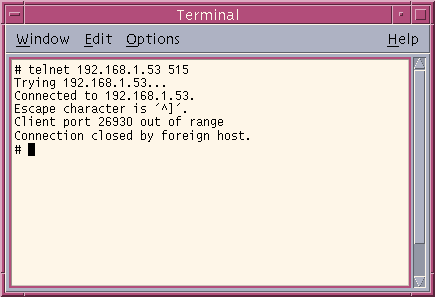
- A successful connection shows a "connected to <address>" message indicating connectivity. After pressing enter, the connection will close and a message will be displayed similar to the one in the graphic. If the RPM log has this same message, your test was successful.
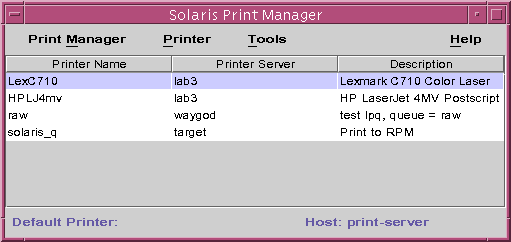
- Open the Solaris Print Manager, a printer configuration tool for the Common Desktop Environment (CDE). There is also a text-based printer configuration utility for configuring printers without the CDE.
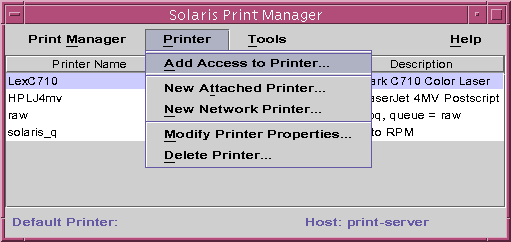
- Select Add Access to Printer from the Printer menu.
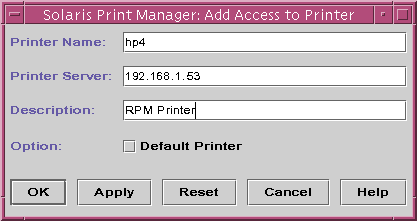
- When prompted to enter the printer name, enter the RPM queue name. The Print Server parameter needs the RPM computer's IP address. The description is optional. To use this printer as the default, select that option. Now press OK.
- In the Solaris Print Manager, you should now see this new printer listed.
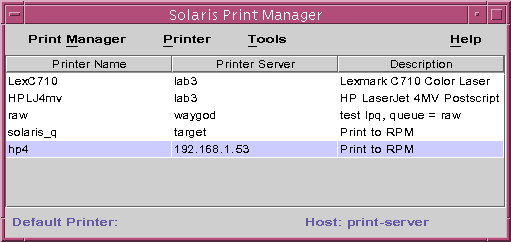
- To test this printer, you can run the following command from a UNIX command line:
cat /etc/printcap | lp -d hp4.
You have now successfully configured Sun Solaris to print through RPM.